Basler ace acA1300-60gm
- EV76C560 Sensor
- 60 fps Frame rate
- 1.3 MP Resolution (MP)
- GigE Interface
- 1/1.8" Sensor Format
The Basler acA1300-60gm GigE camera with the e2v EV76C560 CMOS sensor delivers 60 frames per second at 1.3 MP resolution.

Direct support from local Basler teams
Secure checkout and data protection
General Information
| Manufacturer | Basler |
|---|---|
| Order Number | 106793 |
| Product Family | ace Classic |
| Product Line | ace Classic |
| Camera Series | Basler ace |
| Camera Category | Area Scan Camera |
| Warranty | 36 Months |
Sensor
| Sensor Vendor | e2v |
|---|---|
| Sensor | EV76C560 |
| Shutter | Global & Rolling Shutter |
| Sensor Format | 1/1.8" |
| Sensor Diagonal | 8.68 mm |
| Sensor Type | CMOS |
| Sensor Size | 6.8 mm × 5.4 mm |
| Resolution (H x V) | 1282 px × 1026 px |
| Resolution | 1.3 MP |
| Pixel Size (H x V) | 5.3 μm × 5.3 μm |
| Frame rate | 60 fps |
| Mono/Color | Mono |
| Spectrum | Visible |
EMVA Data
| Quantum Efficiency (typical/minimal) | 54 % (typical) |
|---|---|
| Dark Noise (typical/maximal) | 24.7 e¯ (typical) |
| Saturation Capacity (typical/minimal) | 9.5 ke¯ (typical) |
| Dynamic Range (typical/minimal) | 51.7 dB (typical) |
| Signal-to-Noise Ratio (typical/minimal) | 39.8 dB (typical) |
Camera Data
| Interface | GigE |
|---|---|
| Camera Data Connector | RJ45 receptacle (GigE) |
| Image Data Interface | Fast Ethernet (100 Mbit/s), Gigabit Ethernet (1000 Mbit/s) |
| Pixel Bit Depth | 12 bits |
| Synchronization |
|
| Exposure Control | programmable via the camera API |
| Camera I/O Connector | Hirose HR10A 6-pin plug |
| Digital Input | 1 |
| Digital Output | 1 |
| Power Supply | PoE or 12 VDC |
| Power Requirements (typical) | 2 W |
| Power Consumption PoE | 2.6 W |
Housing
| Housing Type | Box |
|---|---|
| Housing Size (L x W x H) | 42 mm x 29 mm x 29 mm |
| Weight | 90 g |
| Lens Mount | C-mount |
| Operating Temperature | 0 °C - 50 °C |
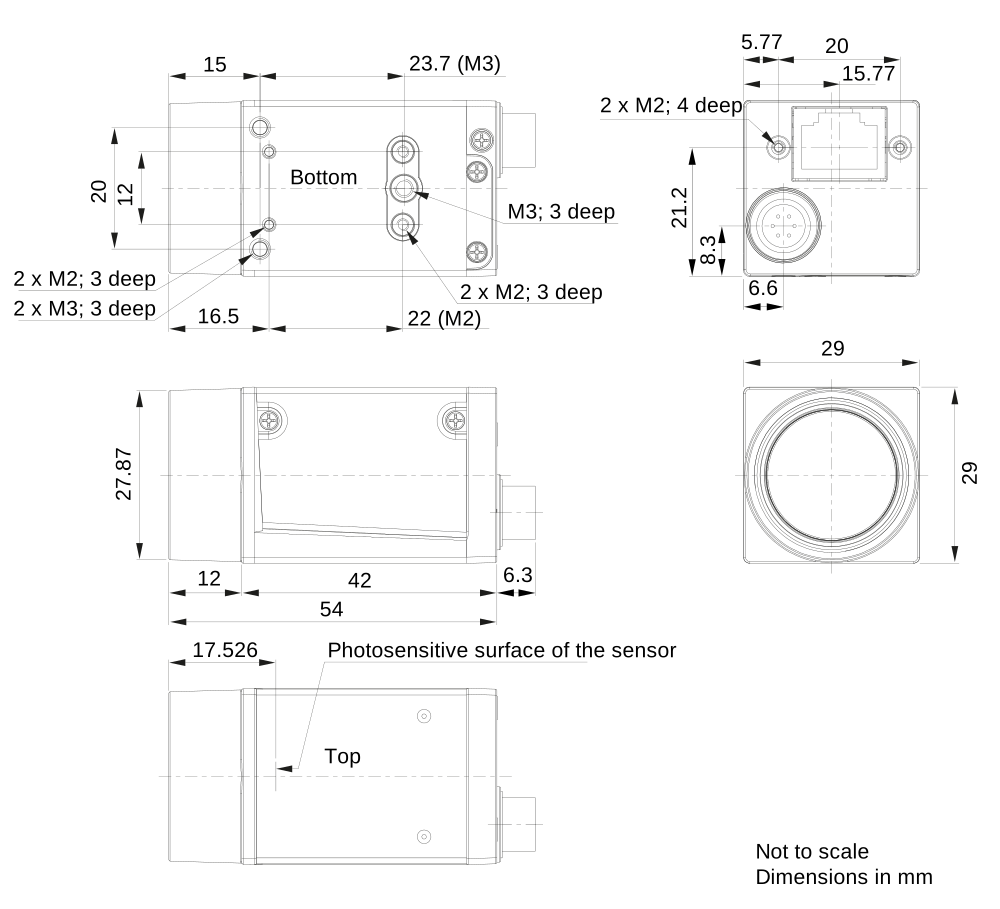
Technical Drawing
Conformity
- CE (incl. RoHS)
- EAC
- FCC
- GenICam
- GigE Vision
- IEEE 802.3af (PoE)
- IP30
- KC
- RoHS
- UKCA
- UL
Features
For more information about the features, visit the Documentation
Easy Handling
| Auto Functions | Use the camera's auto functions to allow the camera to find the optimum settings for exposure time, gain, and white balance, for example. This simplifies camera integration into your application. |
| Presettings | Automate recurring steps in your application by using the camera's default settings and/or creating and saving your own presets. |
Image Quality Optimization
| Image Adjustment | Adjust pixel values losslessly with Black Level, Digital Shift, and other standard features. |
Process Control
| Digital I/Os | Control the camera via trigger commands or use the camera to control components of your vision system, such as lighting or encoders. |
| Information Utilisation | Use additional information from Chunks and Events to optimize your automation. |
| Sequencer | Program sequential processes in the camera to control image acquisition and pre-processing in real time. |
Speed Increase
| Data Reduction | Use the Binning, Decimation, or ROI features for customized data reduction. |