Basler ace 2 a2A2840-14gcPRO
- IMX546 Sensor
- 14 fps Frame rate
- 8.1 MP Resolution (MP)
- GigE Interface
- 2/3" Sensor Format
The Basler a2A2840-14gcPRO GigE camera with the Sony IMX546 CMOS sensor delivers 14 frames per second at 8 MP resolution.

Select your model
Select Product Line:
Direct support from local Basler teams
Secure checkout and data protection
General Information
| Manufacturer | Basler |
|---|---|
| Order Number | 108427 |
| Product Family | ace 2 R |
| Product Line | ace 2 R Pro |
| Camera Series | Basler ace 2 |
| Camera Category | Area Scan Camera |
| Warranty | 36 Months |
Sensor
| Sensor Vendor | Sony |
|---|---|
| Sensor | IMX546 |
| Shutter | Global Shutter |
| Sensor Format | 2/3" |
| Sensor Diagonal | 11 mm |
| Sensor Type | CMOS |
| Sensor Size | 7.78 mm × 7.78 mm |
| Resolution (H x V) | 2840 px × 2840 px |
| Resolution | 8 MP |
| Pixel Size (H x V) | 2.74 μm × 2.74 μm |
| Frame rate | 14 fpsCalculate individual frame rate |
| Mono/Color | Color |
| Spectrum | Visible |
Camera Data
| Interface | GigE |
|---|---|
| Camera Data Connector | RJ45 receptacle (GigE) |
| Image Data Interface | Fast Ethernet (100 Mbit/s), Gigabit Ethernet (1000 Mbit/s) |
| Pixel Bit Depth |
|
| Exposure Control |
|
| Camera I/O Connector | M8 6-Pin receptacle |
| Digital Input | 1 |
| General Purpose I/O | 2 |
| Power Supply | PoE or 12-24 VDC |
| Power Requirements (typical) | 3.2 W |
Housing
| Housing Type | Box |
|---|---|
| Protection Class | IP30 |
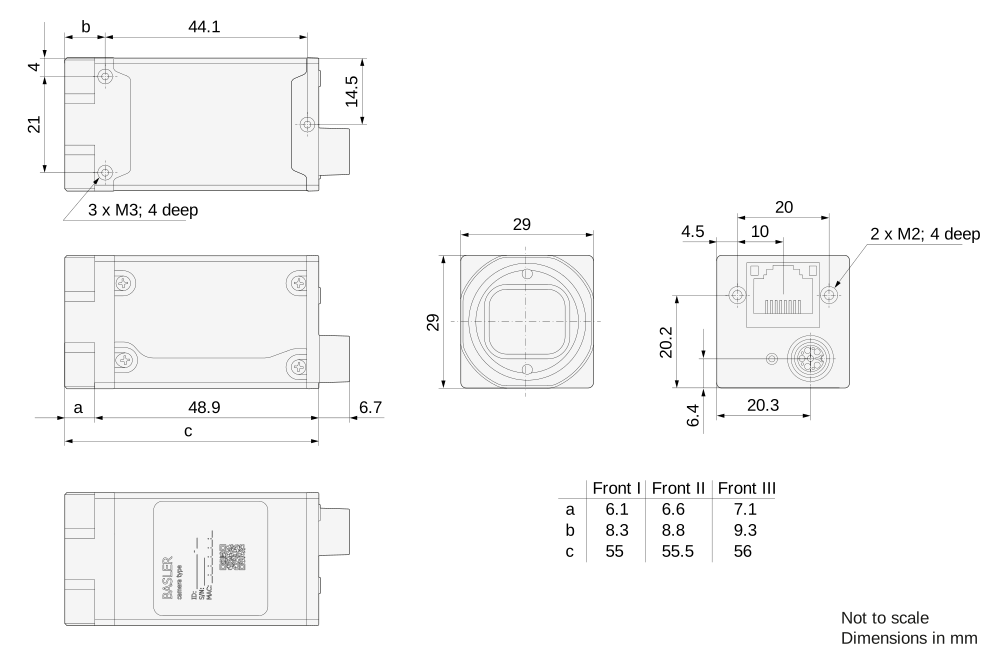
| Housing Size (L x W x H) | 55.5 mm x 29 mm x 29 mm |
| Weight | 100 g |
| Lens Mount | C-mount |
| Operating Temperature | -10 °C - 50 °C |
Technical Drawing
Conformity
- CE (incl. RoHS)
- EAC
- FCC
- GenICam
- GigE Vision 2.0
- IP30
- KC
- RoHS
- UKCA
- UL
Features
For more information about the features, visit the Documentation
Easy Handling
| Auto Functions | Use the camera's auto functions to allow the camera to find the optimum settings for exposure time, gain, and white balance, for example. This simplifies camera integration into your application. |
| Presettings | Automate recurring steps in your application by using the camera's default settings and/or creating and saving your own presets. |
Image Quality Optimization
| Color Creation | With this set of features, you can correct artifacts in color images without affecting the structures in the image. |
| Image Adjustment | Adjust pixel values losslessly with Black Level, Digital Shift, and other standard features. |
| Improvement of Image Quality | Reduce image artifacts caused by environmental influences. Correct individual pixel errors using Defect Pixel Correction. |
| PGI - Patented | Use the complete image enhancement package or choose from Denoising, Sharpness, Debayering, and Color-Anti-Aliasing to adjust the image quality. |
Process Control
| Burst Mode | Acquire a sequence of images after triggering once and output them as required. In High-Speed Burst Mode, you can temporarily bypass the data limitation of GigE. |
| Digital I/Os | Control the camera via trigger commands or use the camera to control components of your vision system, such as lighting or encoders. |
| Information Utilisation | Use additional information from Chunks and Events to optimize your automation. |
| Intelligent Light Control (SLP) | Control the lighting directly with the camera. By synchronizing the flash mode and adjusting the brightness levels, you can quickly achieve precise lighting conditions and shorten the development time of your application. |
| Sequencer | Program sequential processes in the camera to control image acquisition and pre-processing in real time. |
| Timing | Control the start and end of an exposure individually. Add delays or synchronize multiple cameras in a GigE network using PTP. |
Speed Increase
| Compression Beyond - Patented | Reduce the amount of image data transferred using our patented image compression algorithm and choose between 'lossless' and 'lossy'. |
| Data Reduction | Use the Binning, Decimation, or ROI features for customized data reduction. |
| Pixel Beyond - Patented | Use our patented Binning process to continuously adjust the sensor pixel to meet your needs. Reduce the amount of data or simulate the characteristics of another sensor. |